remote-tcp-monitor
Remote TCP Monitor
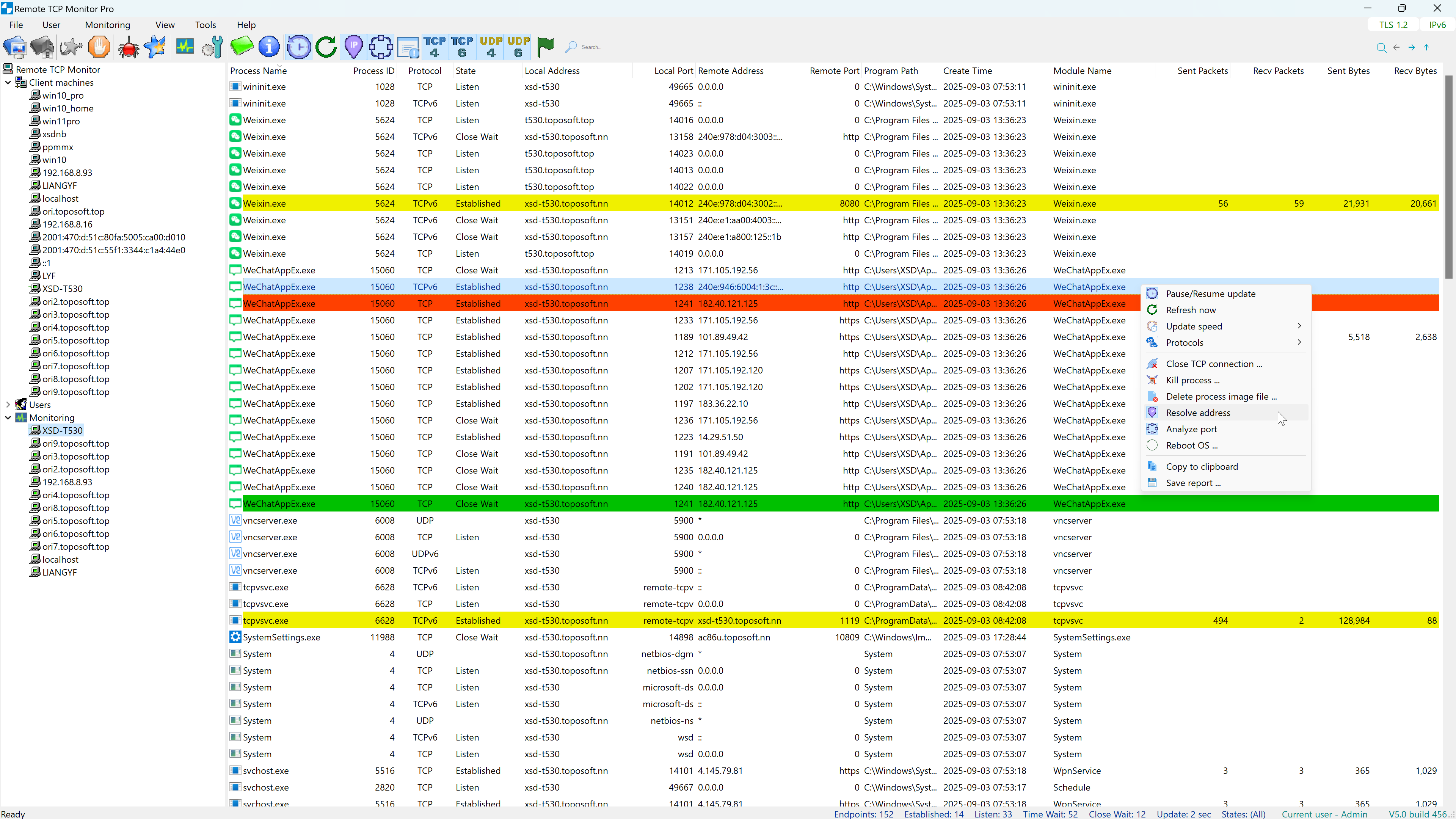
Remote TCP Monitor is a centralized network tool for viewing real-time TCP and UDP connection details across local and remote hosts. Designed for enterprise-level service monitoring, it offers powerful remote access capabilities and centralized management to ensure network availability and operational clarity.
🔍 Key Features
-
🔧 Centralized Maintenance
Unified management interface for all monitored hosts. -
🧭 Host-Level Navigation
Quickly locate listening services and port usage across systems. -
🌐 IPv4 & IPv6 Dual-Stack Support
Full compatibility with modern network environments. -
📌 Real-Time Service Feedback
Instant visibility into service status for diagnostics and troubleshooting. -
🔍 Detailed Endpoint View
Displays TCP/UDP listening ports, connection states, local/remote addresses, associated process and module names, network traffic, etc.
🚀 Automated Deployment via ONE Series Framework
Remote TCP Monitor leverages the ONE Series Remote Installation Framework to streamline agent deployment:
- 🛠️ Agent distribution and installation without manual intervention
- 🔄 Automated update and maintenance mechanisms
- 🧩 Seamless integration with other ONE tools for unified network operations
🌍 Broad Monitoring Support
Remote TCP Monitor offers comprehensive monitoring capabilities across a wide range of devices and operating systems:
- Cross-Platform Host Coverage: Full support for Windows (x64/ARM64), macOS (Apple Silicon ARM64 / Intel x86_64), and multi-architecture Linux systems.
- Embedded & Network Appliances: Extended support for embedded environments, including NAS devices, enterprise APs, OpenWrt routers, and industrial gateways (ARM32/ARM64/MIPS/MIPSEL).
- Flexible Network Reach: Monitor local servers, workstation clusters, or remote hosts across the Internet (subject to network and firewall configurations).
Whether managing a small server pool or a large, heterogeneous distributed infrastructure, Remote TCP Monitor delivers a scalable and maintainable solution for network connectivity visibility.
🖥️ Supported Operating Systems & Architectures
This section outlines officially validated platform specifications for both the Controller GUI (Management Console) and the Monitored Target Devices (TCPv Agent Services).
1. Controller GUI (Management Console)
The management console runs on 64-bit Microsoft Windows platforms. On Windows ARM64 devices (such as Snapdragon X processors), it runs seamlessly via Microsoft’s built-in compatibility layer.
| Operating System / Target Platform | Minimum Supported Version | Execution Mode | Status |
|---|---|---|---|
| Windows x64 | Windows 10 (1809+ / Build 17763) / Server 2016 | Native x64 Execution | Supported |
| Windows 11 x64 | Windows 11 (All builds) | Native x64 Execution | Supported |
| Windows ARM64 | Windows 11 Build 22000+ (Snapdragon X / Surface ARM) | Executed within built-in Windows ARM64 x64 compatibility layer (Prism) | Supported |
2. Monitored Target Devices (TCPv Agent Services)
Client machines are target hosts and appliances monitored remotely via the TCPv service daemon. Select the target architecture via the Select OS Arch menu during host configuration to deploy the correct binary.
| Operating System / Target Platform | Target Architecture / Platform | Minimum Supported Version | Architecture Details & Common Hardware | Status |
|---|---|---|---|---|
| Windows | x64 (64-bit) | Windows 10 / Server 2016 | Standard PC / Workstation / Server (Intel/AMD 64-bit) | Supported |
| ARM64 | Windows 11 Build 22000+ | Modern ARM 64-bit (Windows on ARM / Snapdragon X) | Supported | |
| macOS | ARM64 | macOS 11.0 (Big Sur) | Modern ARM 64-bit (Apple Silicon M-Series) | Supported |
| x86_64 | macOS 11.0 (Big Sur) | Legacy Intel Mac (Intel Core/Xeon 64-bit) | Supported | |
| Linux (Includes embedded devices like NAS, Routers, Gateways) |
x86_64 | Kernel 2.6.39+ | Standard PC, Cloud Server, x86 NAS (Synology, QNAP, Unraid) | Supported |
| ARM64 / AArch64 | Kernel 3.10+ | Modern ARM Servers, Single-Board Computers, ARM NAS, Raspberry Pi 4/5 | Supported | |
| ARMv7 Hard-Float | Kernel 2.6.39+ | ARMv7 32-bit (EABIHF / armhf) - Industrial Gateways, Smart Switches | Supported | |
| ARMv7 SoftFP | Kernel 2.6.36+ | ARMv7 32-bit + VFPv3 (EABI) - High-Performance Routers, Home Gateways | Supported | |
| ARMv7 Pure Soft-Float | Kernel 2.6.36+ | ARMv7 32-bit (EABI) - Legacy Embedded Systems (No FPU) | Supported | |
| MIPS32 Big-Endian | Kernel 2.6.36+ | MIPS32 BE - Pure Soft-Float (mips) - Routers, Enterprise APs, Embedded Devices |
Supported | |
| MIPSEL32 Little-Endian | Kernel 2.6.22+ | MIPSEL32 LE - Pure Soft-Float (mipsel) - OpenWrt Routers, Compact NAS, TV Boxes |
Supported |
Note: The listed hardware examples are not exhaustive; other compatible devices may also apply.
🛒 UWP app from Microsoft Store
| Edition | Description | Store Link |
|---|---|---|
| Trial | Full monitoring features for 30 days; continues in Local Free mode afterward. | Get Trial |
| Std | Full monitoring features for small networks with up to 100 monitored devices. | Get Std |
| Pro | Full monitoring features for medium to large networks with unlimited monitored devices. | Get Pro |
📦 Installation
To install Remote TCP Monitor agents remotely, it is recommended to use the built-in ONE Series Remote Installation Framework.
Refer to the Installation Guide for step-by-step instructions.
📄 License
This website is for documentation and binary distribution only. Forking for derivative work or redistribution is not permitted. Remote TCP Monitor is a commercial product, not open source.
📬 Support
For product inquiries, licensing, or technical support, please contact the publisher via the Microsoft Store or your enterprise support channel.